加载配置
Coding Style wiki
方式一:代码指定
透过代码指定的方式,直接指定特定热更 DLL 加载。
注意 优点:效率高,直接执行。 缺点:不易维护,更改热更 DLL 后,需要重新打包编译 AOT。
Hotfixers.CheckHotfix
(
    // Download and load hotfix files from HotfixPackage
    "HotfixPackage",
    // Metadata for AOT assemblies
    new string[]
    {
        "mscorlib.dll",
        "UniTask.dll"
    },
    // Hotfix assemblies
    new string[]
    {
        "HotfixerDemo.Hotfix.Runtime.dll"
    }
);
方式二:配置文件
透过配置文件的方式,自动从 StreamingAssets 读取配置文件后,进行热更 DLL 加载。
注意 优点:容易维护,不需要重新打包编译 AOT,即可替换热更 DLL。 缺点:需要请求读取文件,会有极少量的性能损失。
// Auto try to load HotfixManifest.dat from StreamingAssets
Hotfixers.CheckHotfix
(
    // Download and load hotfix files from HotfixPackage
    "HotfixPackage",
    () =>
    {
        Debug.LogWarning("<color=#ff8321>Please generate the HotfixManifest.dat file in the StreamingAssets folder using the MenuItem -> OxGFrame/Hotfixer/Hotfix Dll Config Generator.</color>");
    }
);
生成配置文件
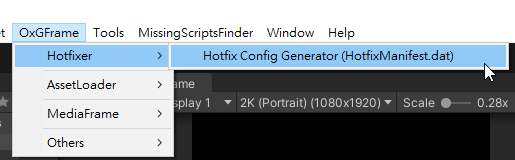
开启 Hotfix Dll Config Generator。
填写相关配置后,点击 Cipher Process / Plaintext Process 按钮即可生成配置文件 (自动输出至 StreamingAssets 底下)。
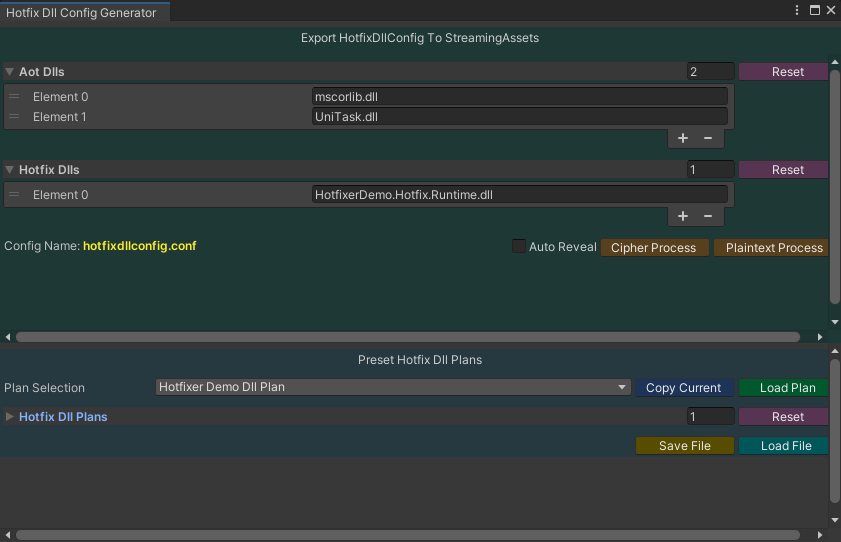
配置文件输出与内容。


提醒 HotfixManifest.dat 文件名称与扩展名都可以自行客製化 (参考配置设定)。
编码转换
如果输出密文或明文,都可以选择文件直接使用 Right-Click 进行转换。

重要 开发期间建议使用 Plaintext 比较利于除错,正式发布则强烈建议使用 Cipher。