加載配置
Coding Style wiki
方式一:代碼指定
透過代碼指定的方式,直接指定特定熱更 DLL 加載。
注意 優點:效率高,直接執行。 缺點:不易維護,更改熱更 DLL 後,需要重新打包編譯 AOT。
Hotfixers.CheckHotfix
(
    // Download and load hotfix files from HotfixPackage
    "HotfixPackage",
    // Metadata for AOT assemblies
    new string[]
    {
        "mscorlib.dll",
        "UniTask.dll"
    },
    // Hotfix assemblies
    new string[]
    {
        "HotfixerDemo.Hotfix.Runtime.dll"
    }
);
方式二:配置文件
透過配置文件的方式,自動從 StreamingAssets 讀取配置文件後,進行熱更 DLL 加載。
注意 優點:容易維護,不需要重新打包編譯 AOT,即可替換熱更 DLL。 缺點:需要請求讀取文件,會有極少量的性能損失。
// Auto try to load HotfixManifest.dat from StreamingAssets
Hotfixers.CheckHotfix
(
    // Download and load hotfix files from HotfixPackage
    "HotfixPackage",
    () =>
    {
        Debug.LogWarning("<color=#ff8321>Please generate the HotfixManifest.dat file in the StreamingAssets folder using the MenuItem -> OxGFrame/Hotfixer/Hotfix Dll Config Generator.</color>");
    }
);
生成配置文件
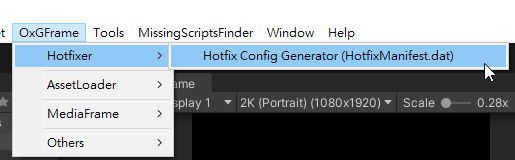
開啟 Hotfix Dll Config Generator。
填寫相關配置後,點擊 Cipher Process / Plaintext Process 按鈕即可生成配置文件 (自動輸出至 StreamingAssets 底下)。
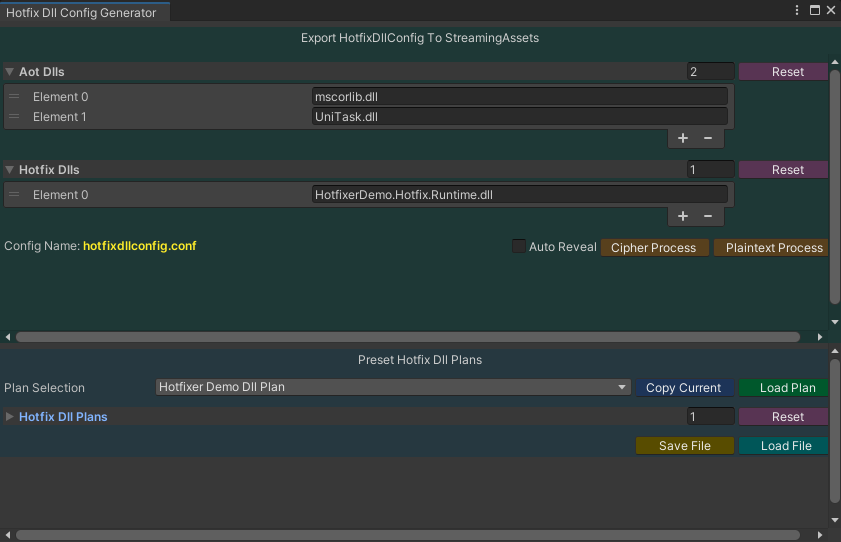
配置文件輸出與內容。


提醒 HotfixManifest.dat 文件名稱與擴展名都可以自行客製化 (參考配置設定)。
編碼轉換
如果輸出密文或明文,都可以選擇文件直接使用 Right-Click 進行轉換。

重要 開發期間建議使用 Plaintext 比較利於除錯,正式發佈則強烈建議使用 Cipher。