Hotfixers
Coding Style wiki
Hotfixers is the unified entry point (Facade) of the Hotfixer module. Integrated with the HybridCLR code hot-update solution, it covers hotfix checking (download & load), AOT metadata supplementation, hotfix DLL loading, and state queries.
| Namespace | OxGFrame.Hotfixer |
| Type | public static class |
| Source | Hotfixers.cs |
using OxGFrame.Hotfixer;
Reminder If you have questions about HybridCLR, see the official documentation. For a complete usage flow, check the HotfixerDemo sample (importable from the Package Manager).
Quick Start
// Start the hotfix flow (auto-reads HotfixManifest.dat from StreamingAssets)
Hotfixers.CheckHotfix("HotfixPackage");

// Wait until the hotfix is done before entering the main game logic and asset patching
await UniTask.WaitUntil(() => Hotfixers.IsDone());

// The main assembly cannot reference the hotfix assembly directly — call hotfix code via reflection
var assembly = Hotfixers.GetHotfixAssembly("HotfixerDemo.Hotfix.Runtime.dll");
assembly?.GetType("Hello")?.GetMethod("Run")?.Invoke(null, null);
General Rules
Core Mechanism
Hotfixers is integrated with HybridCLR and is responsible for the following at runtime:
- Supplementing AOT metadata: solves issues such as AOT generic instantiation (via
RuntimeApi.LoadMetadataForAOTAssemblywithHomologousImageMode.SuperSet). - Loading hotfix DLLs: loads the updated code logic into the runtime via
Assembly.Load.
Important The main (AOT) assembly cannot reference the hotfix assemblies directly. After loading completes, call into the hotfix layer via reflection (use GetHotfixAssembly to obtain the assembly).
Reminder The AOT / Hotfix DLLs must first be collected with the editor tool HotfixHelper (as .dll.bytes) and packed into the hotfix package with YooAsset. See the Collection Example.
Hotfix Flow
After calling CheckHotfix, the internal state machine runs through the following steps in order:
| Step | State | Description |
|---|---|---|
| 1 | FsmHotfixPrepare | Prepares the flow. |
| 2 | FsmInitHotfixPackage | Initializes the hotfix package; sends HotfixInitFailed on failure. |
| 3 | FsmUpdateHotfixPackage | Updates the hotfix package version; sends HotfixUpdateFailed on failure. |
| 4 | FsmHotfixCreateDownloader | Creates the downloader. If there are files to download, sends HotfixCreateDownloader and waits for user confirmation; otherwise skips ahead to download-over. |
| 5 | FsmHotfixBeginDownload | Starts downloading; sends HotfixDownloadProgression progress events, and HotfixDownloadFailed on file failures. |
| 6 | FsmHotfixDownloadOver | Download finished. |
| 7 | FsmHotfixClearCache | Clears unused cache files. |
| 8 | FsmLoadAOTAssemblies | Supplements metadata for the AOT assemblies (HybridCLR RuntimeApi.LoadMetadataForAOTAssembly). |
| 9 | FsmLoadHotfixAssemblies | Loads the hotfix assemblies (Assembly.Load). |
| 10 | FsmHotfixDone | Flow completed; IsDone returns true. |
- When there are files to download, the flow stops at step 4 until the user sends the
UserBeginDownloadevent to confirm the download (see Flow Events). - Each DLL is loaded as a
TextAssetfrom the hotfix package, using the list entry name (including.dll) as the asset name, and is unloaded right after loading. - In
EditorSimulateMode, AOT metadata supplementation is skipped; in the Editor or when hotfix is disabled, hotfix assemblies are resolved from the current AppDomain instead of loading the DLL bytes.
Config File HotfixManifest.dat
The auto-config overloads of CheckHotfix request the hotfix config file from StreamingAssets and start the flow based on its content:
- The file name defaults to
HotfixManifest.datand can be customized (name and extension) viaHotfixSettings— see Global Settings. - The content holds the
aotDllsandhotfixDllslists (names include the.dllextension). Both plaintext JSON and encrypted BYTES formats are supported and auto-detected by the file header when read. - The file can be generated with HotfixHelper.ExportHotfixDllConfig or the editor window tool via the menu OxGFrame → Hotfixer → Hotfix Config Generator (HotfixManifest.dat).
The plaintext JSON format looks like this:
{
    "aotDlls": [
        "mscorlib.dll",
        "UniTask.dll"
    ],
    "hotfixDlls": [
        "HotfixerDemo.Hotfix.Runtime.dll"
    ]
}
Flow Events
The hotfix flow broadcasts and receives events through UniEvent (UniFramework.Event). The events are defined in the OxGFrame.Hotfixer.HotfixEvent namespace.
Sent by the framework (HotfixEvents) — listen to these
| Event | Description |
|---|---|
HotfixFsmState | Flow state change notification, carrying the current state node stateNode. |
HotfixInitFailed | Hotfix package initialization failed. |
HotfixUpdateFailed | Hotfix package version update failed. |
HotfixCreateDownloader | Downloader created, carrying the pending file count totalCount and total size totalBytes. |
HotfixDownloadProgression | Download progress, carrying progress, counts, sizes, and download speed. |
HotfixDownloadFailed | A file download failed, carrying fileName and error. |
Sent by the user (HotfixUserEvents) — drive the flow forward
| Event | Description |
|---|---|
UserTryInitHotfix | Retries initializing the hotfix package. |
UserTryUpdateHotfix | Retries updating the hotfix package. |
UserTryCreateDownloader | Retries creating the downloader. |
UserBeginDownload | Confirms and begins downloading the hotfix files. |
using OxGFrame.Hotfixer.HotfixEvent;
using UniFramework.Event;

// Listen for the downloader-created event, then confirm to begin the download
UniEvent.AddListener<HotfixEvents.HotfixCreateDownloader>((message) =>
{
    var msgData = message as HotfixEvents.HotfixCreateDownloader;
    Debug.Log($"Files to download: {msgData.totalCount}, total size: {msgData.totalBytes}");
    HotfixUserEvents.UserBeginDownload.SendEventMessage();
});
Disabling Hotfix
Important If HybridCLR is disabled (the Enable checkbox is unchecked in HybridCLR Settings), the macro OXGFRAME_HYBRIDCLR_DISABLED must also be defined to effectively strip the hotfix flow.
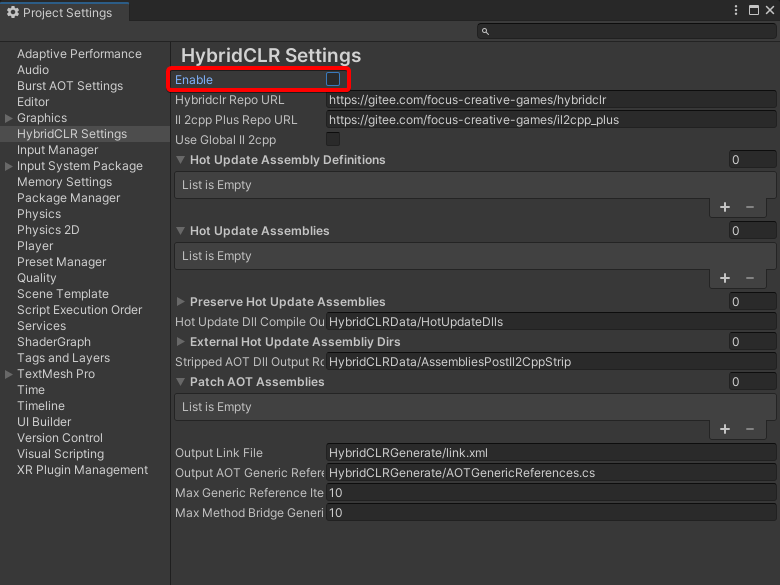
With the macro defined, IsDisabled returns true, AOT metadata supplementation is skipped, and hotfix assemblies are resolved from the current AppDomain instead.
Method Overview
Hotfix Check
| Method | Description |
|---|---|
| CheckHotfix | Starts the hotfix flow: downloads and loads all hotfix files. |
Status & Reset
| Method | Description |
|---|---|
| IsDone | Returns whether the hotfix flow has fully completed. |
| IsDisabled | Returns whether the hotfix feature is disabled. |
| Reset | Resets the hotfix flags and cached data. |
Assembly Info
| Method | Description |
|---|---|
| GetAOTAssemblyNames | Gets the AOT assembly names (including the .dll extension). |
| GetAotAssemblyNamesWithoutExtensions | Gets the AOT assembly names (without the extension). |
| GetHotfixAssemblyNames | Gets the hotfix assembly names (including the .dll extension). |
| GetHotfixAssemblyNamesWithoutExtensions | Gets the hotfix assembly names (without the extension). |
| GetHotfixAssembly | Gets a loaded Assembly object by name. |
CheckHotfix
public static void CheckHotfix(string packageName, Action errorAction = null)
public static void CheckHotfix(PackageInfoWithBuild packageInfoWithBuild, Action errorAction = null)
public static void CheckHotfix(string packageName, string[] aotAssemblies, string[] hotfixAssemblies)
public static void CheckHotfix(PackageInfoWithBuild packageInfoWithBuild, string[] aotAssemblies, string[] hotfixAssemblies)
Parameters
| Parameter | Type | Description |
|---|---|---|
| packageName | string | Hotfix package name. |
| packageInfoWithBuild | PackageInfoWithBuild | Custom package info (lets you specify the build mode, etc.; namespace OxGFrame.AssetLoader.Bundle). |
| errorAction | Action | Callback invoked when the config file request fails (invalid URL, request error, or timeout), returns empty data, or the config cannot be parsed. Default: null |
| aotAssemblies | string[] | List of AOT assemblies that need metadata supplementation (names include the .dll extension). |
| hotfixAssemblies | string[] | List of hotfix assemblies (names include the .dll extension). |
Description
Starts the hotfix flow: downloads and loads all hotfix-related files. See the Hotfix Flow for the full procedure. The overloads come in two modes:
- Auto-config mode (
errorActionoverloads): automatically requests theHotfixManifest.datconfig file fromStreamingAssets(see Config File), parses the AOT and hotfix assembly lists, and starts the flow. - Manual mode (
aotAssembliesoverloads): pass the AOT assemblies to supplement and the hotfix assemblies directly.
- This is a non-blocking call. Track completion with IsDone or the flow events.
- The
packageName-only overloads initialize the package as anAppPackageInfoWithBuild(build modeScriptableBuildPipeline). To customize the build mode, use thePackageInfoWithBuildoverloads instead. - Calling again while the flow is running is ignored (a warning is logged).
- Calling again after the flow has completed returns immediately (a warning is logged); call Reset first to run it again.
Example
// Auto-config mode: reads HotfixManifest.dat from StreamingAssets
Hotfixers.CheckHotfix
(
    "HotfixPackage",
    () => Debug.LogWarning("Config file request failed. Please generate HotfixManifest.dat first.")
);

// Manual mode: pass the AOT and hotfix assembly lists directly
Hotfixers.CheckHotfix
(
    "HotfixPackage",
    // AOT assemblies that need metadata supplementation
    new string[] { "mscorlib.dll", "UniTask.dll" },
    // Hotfix assemblies
    new string[] { "HotfixerDemo.Hotfix.Runtime.dll" }
);
IsDone
public static bool IsDone()
Returns
bool — whether the hotfix flow has fully completed (true once both download and load are finished).
Description
Returns the hotfix completion state. It is recommended to wait until this becomes true before entering the main game logic and asset patching.
Example
Hotfixers.CheckHotfix("HotfixPackage");

// Wait until the hotfix is done
await UniTask.WaitUntil(() => Hotfixers.IsDone());

// Enter the main game flow
IsDisabled
public static bool IsDisabled()
Returns
bool — whether the hotfix feature is disabled; returns true when the project defines the OXGFRAME_HYBRIDCLR_DISABLED macro.
Description
Checks whether the hotfix feature is disabled in the current environment (determined by a compile-time macro; typically used for developer mode).
Important If HybridCLR is disabled, the macro OXGFRAME_HYBRIDCLR_DISABLED must be defined to effectively strip the hotfix flow (see Disabling Hotfix).
Reset
public static void Reset()
Description
Resets the hotfix flags and cached data (the done flag, the recorded AOT / hotfix assembly names, and the loaded Assembly cache), allowing CheckHotfix to run again.
Reminder Reloading updated hotfix DLLs after a reset falls under HotReload, which requires the HybridCLR commercial edition (not supported by the community edition).
GetAOTAssemblyNames
public static string[] GetAOTAssemblyNames()
Returns
string[] — the AOT assembly names (including the .dll extension); null if CheckHotfix has not been executed yet.
Description
Gets the list of AOT assemblies that need metadata supplementation. The list is set when CheckHotfix is called.
GetAotAssemblyNamesWithoutExtensions
public static string[] GetAotAssemblyNamesWithoutExtensions()
Returns
string[] — the AOT assembly names with the .dll extension trimmed; null if CheckHotfix has not been executed yet.
Description
Same as GetAOTAssemblyNames, but the names exclude the .dll extension (converted and cached on first call).
GetHotfixAssemblyNames
public static string[] GetHotfixAssemblyNames()
Returns
string[] — the hotfix assembly names (including the .dll extension); null if CheckHotfix has not been executed yet.
Description
Gets the list of hotfix assembly names. The list is set when CheckHotfix is called.
GetHotfixAssemblyNamesWithoutExtensions
public static string[] GetHotfixAssemblyNamesWithoutExtensions()
Returns
string[] — the hotfix assembly names with the .dll extension trimmed; null if CheckHotfix has not been executed yet.
Description
Same as GetHotfixAssemblyNames, but the names exclude the .dll extension (converted and cached on first call).
GetHotfixAssembly
public static Assembly GetHotfixAssembly(string assemblyName)
Parameters
| Parameter | Type | Description |
|---|---|---|
| assemblyName | string | Hotfix assembly name (including the .dll extension, e.g. HotfixerDemo.Hotfix.Runtime.dll). |
Returns
Assembly — the loaded hotfix assembly; null if not found.
Description
Gets a loaded Assembly object by name. Since the main assembly cannot reference the hotfix assemblies directly, use this method to obtain the assembly and call into the hotfix layer via reflection.
Example
// After the hotfix is done, enter the hotfix layer via reflection
var assembly = Hotfixers.GetHotfixAssembly("HotfixerDemo.Hotfix.Runtime.dll");
assembly?.GetType("Hello")?.GetMethod("Run")?.Invoke(null, null);